
Video Identity Verification
On this page, you will learn how to verify a person’s identity using a mobile video process.
The Video Identity verification service allows you to collect and verify a person’s ID document using their smartphone camera.
It is available in three products, designed for different assurance levels and regulatory needs.
Depending on the product, you can verify ID cards, passports, residence permits, driving licences, and travel documents.
How it works
The verification process is straightforward and involves just a few steps:
- You initiate a Video Identity Verification request and receive a URL in return: you can share this URL with the person whose identity needs to be verified, or directly redirect them to it.
- The person opens the URL and follows a mobile process They capture their ID document (front and back) and, if required, a face capture and video challenges. Video Identity Verification can only be completed on mobile. If the URL is opened on desktop, we display a QR code so the person can continue on their phone.
- Once the identity is verified, you receive the response via a webhook or by calling a designated endpoint.
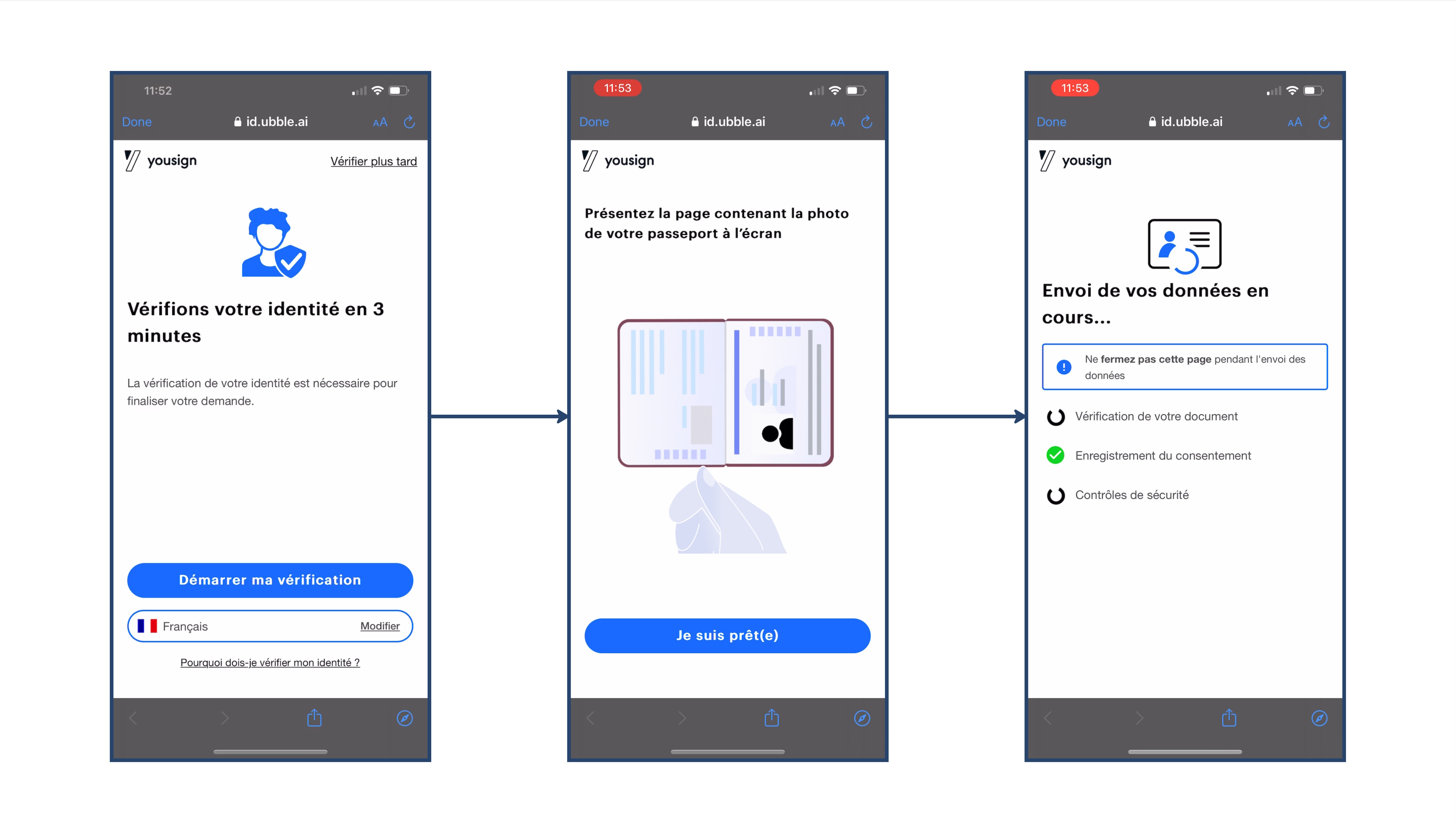
Type of Video Identity Verification
We offer three types of Video Identity Verification products, adapted to your needs:
- Video Identity Verification: Captures an ID document live on mobile and runs automated checks.
- Face Match Identity Verification: Adds face recognition to the ID document live capture to confirm the person presenting the document matches the document holder.
- Certified Identity Verification – PVID: Certified by the ANSSI, it combines face recognition with video challenges and systematic human review, and provides a sealed proof file retained for 6 years to support dispute handling and regulatory requirements.
The table below compares the three products and shows which checks are performed for each of them.
| Checks | Video Identity Verification | Face Match Identity Verification | Certified Identity Verification - PVID |
|---|---|---|---|
| Live document capture | ✅ | ✅ | ✅ |
| Quality, authenticity, name consistency | ✅ | ✅ | ✅ |
| Face recognition | — | ✅ | ✅ |
| Video challenges | — | — | ✅ |
| Human review | 🔄 (fallback) | 🔄 (fallback) | ✅ (systematic) |
| Proof file | — | — | ✅ |
The following glossary explains what each check and feature means in the context of Video Identity Verification.
- Live document capture: Verifies the document presented matches the selected type (e.g., ID card, passport). We also ensure the presenter has the physical document in hand (not a copy or scan).
- Quality: Ensures document readability (e.g., brightness, contrast).
- Authenticity: Performs checks such as MRZ validation, expiration date verification, and visual security analysis.
- Name consistency: Checks that the name extracted from the document matches the data provided when initiating the verification.
- Face recognition: Ensures that the individual presenting the ID document is indeed its rightful owner by comparing the presented face with the one extracted from the document. This step is optional and can be configured when initiating the identity video verification.
- Video challenges: Guides the user through interactive actions during the session (with the document and/or their face) to strengthen liveness checks and fraud resistance.
- Human review: A trained agent reviews the verification to validate the result when required (e.g., as a fallback or systematically, depending on the product).
- Proof file: Generates a complete evidence file of the verification (sealed) that can be retained and used for compliance and dispute handling (e.g., retained for 6 years for PVID).
Updated about 2 months ago