

Understand Workflow Session statuses
Learn how to interpret the statuses of a Workflow Session.
Status levels in a Workflow Session
A Workflow Session contains several layers. Each has its own status:
- Actions – the status of each individual resources (Signature Requests, Identity Document Verifications, etc.).
- Action Groups – groups of related Actions, defined in the Workflow Template.
- Workflow Session – the overall workflow, based on the statuses of its Action Groups.
Statuses always flow upward:
- The status of each Action determines the status of its Action Group.
- The status of all Action Groups together determines the status of the Workflow Session.
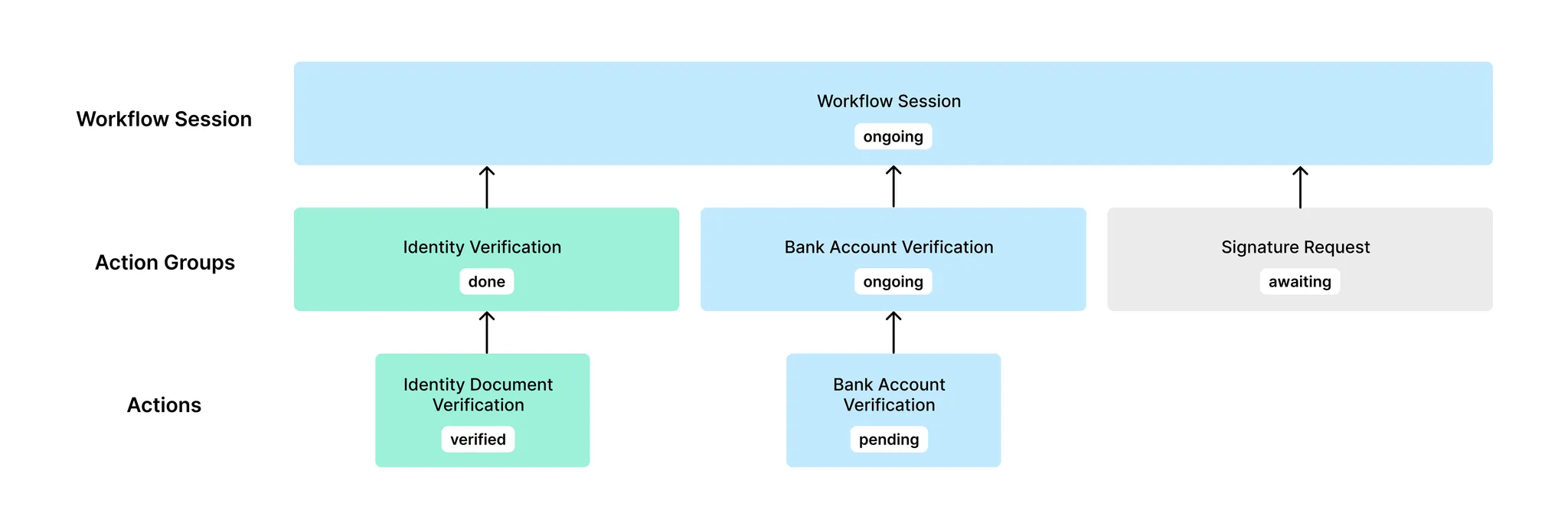
1. Action statuses
An Action is an existing API resource such as a Signature Request or a Verification (e.g. Identity Document Verification, Bank Account Detail Verification).
Its status comes directly from that resource.
| Action type | Possible statuses |
|---|---|
| Signature Request | draft ongoing done deleted expired canceled approval rejected declined deleted |
| Bank Account Document Verification / Bank Account IBAN Verification | pending verified failed inconclusive |
| Image Identity Verification / Video Identity Verification | pending verified failed inconclusive |
| Company Registry Verification | pending verified failed inconclusive |
| Watchlist Screening | pending verified failed |
| Proof of Address Verification | pending verified failed inconclusive |
| Document Analysis | pending done failed inconclusive |
2. Action groups statuses
Each Action Group contains one or more Actions of the same type (e.g., all bank account verifications).
Its status is determined by the statuses of its Actions.
| Action group status | Conditions |
|---|---|
awaiting |
|
done |
|
blocked |
|
ongoing |
|
Special case: deleted Signature Requests
- When a Signature Request is deleted, it remains in the Action Group with status
deleted. - Deleted actions are ignored when computing the Action Group status.
- Example:
- Action Group with SR1 (
deleted) → status =awaiting - Action Group with SR1 (
deleted) + SR2 (done) → status =done
- Action Group with SR1 (
3. Workflow Sessions statuses
| Workflow session status | Conditions |
|---|---|
awaiting | All Action Groups are awaiting |
done | All Action Groups are done |
blocked | At least one Action Group is blocked |
ongoing | At least one Action Group is not awaiting, and none are blocked. |
Example status flow
Let’s take a Workflow Template with two Action Groups: Identity Verification and Signature Request.
- Initial state (no actions yet)
- Action Group - Identity Verification =
awaiting - Action Group - Signature Request =
awaiting - Workflow Session =
awaiting
- Action Group - Identity Verification =
- Add Identity Document Verification (status =
pending)- Action Group - Identity Verification =
ongoing - Action Group - Signature Request =
awaiting - Workflow Session =
ongoing
- Action Group - Identity Verification =
- Identity verified, Signature Request created (draft)
- Action Group - Identity Verification =
done - Action Group - Signature Request =
awaiting(still in draft) - Workflow Session =
ongoing
- Action Group - Identity Verification =
- Signature Request completed
- Action Group - Identity Verification =
done - Action Group - Signature Request =
done - Workflow Session =
done
- Action Group - Identity Verification =