

Applicants
On this page, you will learn all there is to know about Appplicants and the role they play in Workflow Sessions.
What is an Applicant ?
An Applicant represents the end user that will upload his documents on your Workflow Session Link. Applicants can be of two types : legal_person , natural_person.
{
    "label": "Kelly Smith",
    "type" : "natural_person",
    "natural_person" : {
        "identity" : {
            "first_name" : "Kelly",
            "last_name" : "Smith"
        },
        "address" : {
            "line_1" : "123 York Street",
            "line_2" : null,
            "city" : "Paris",
            "postal_code" : "123"
        },
        "bank_account" : {
            "iban" : "FR7630001007941234567890185",
            "bic" : "BCHAFR21"
        }
    }

}
{
"label": "Yousign",
"type" : "legal_person",
"reference_id" : "123",
"legal_person" : {
"company_name" : "Yousign",
"country_code" : "FR",
"bank_account" : {
"iban" : "FR7630001007941234567890185",
"bic" : "BCHAFR21"
},
"legal_representatives" : [
{
"first_name" : "Jean",
"last_name" : "Dupont"
}
]
}Applicant data are compared to data extracted from Documents and used to perform Verifications. Keep in mind that a rich Applicant description provides more cross reference check points in your Verifications.
Additionally :
- A Workflow Session can contain one or more Applicants.
- You can update the information that describe your Applicant at any time this allows you to collect information progressively on your end.
Applicant's statuses
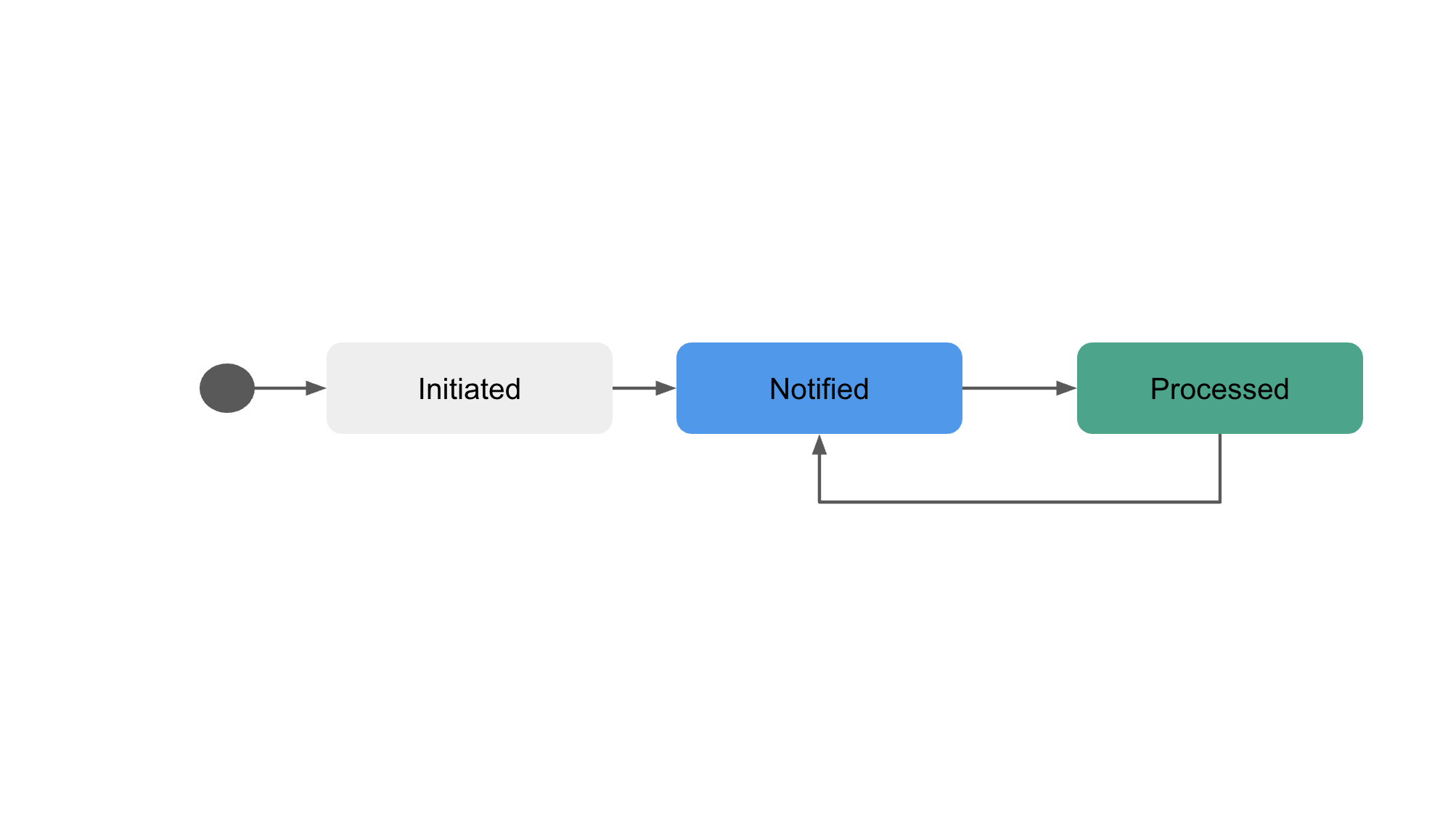
The Applicant's status depends entirely on the Verifications Attached to the given Applicant. Workflow Session status lives at a higher level and helps you track the overall Workflow progress.
| Status | Details |
|---|---|
initiated | The Applicant has been added to a Workflow Session and is waiting to be notified to verify his documents |
notified | The Applicant can verify his documents. A Workflow Session Link can be retrieved. An applicant is in notified status when he is attached to at least 1 Verification. |
processed | All Actions attached to the Applicant are in done status. |
Applicant's lifecycle
An Applicant can move from the processedstatus to the notified status if a new Verification is initiated for the given Applicant.