

The POST /v3/signature_requests/{signatureRequestId}/documents endpoint now accepts a flatten boolean parameter. When set to true, the uploaded PDF is flattened before storage, converting layers, form fields, and embedded elements into a single static layer. This resolves processing errors caused by complex or non-standard PDF structures. Learn more on our guide.
French tax notice verification was already available, you can now use Document Trust to process Italian and German tax notice.
To analyze a tax notice, set document_type to tax_notice and country_code to FR, IT, or DE when you initiate a Document Trust.
To learn more, see the Document Trust guide.
You can now use Document Trust to process French, Italian, and German invoices.
To analyze an invoice, set document_type to invoice and country_code to FR, IT, or DEwhen you initiate a Document Trust.
To learn more, see the Document Trust guide.
You can now create and manage Custom Experiences in the Sandbox environment, both in the app and via the API.
Custom Experiences are now scoped per environment. Production and Sandbox each have their own independent set of Custom Experiences:
- Quota is per environment. Your plan’s limit applies independently to Production and Sandbox. Usage in one does not reduce the other.
- A Custom Experience applies to a Signature Request only if both are in the same environment.
- Existing Custom Experiences have been replicated in Sandbox with the same IDs. No action is required.
Custom Experiences are available on Pro (up to 2 per environment) and Scale (unlimited) plans.
Document Trust allows companies and compliance teams to analyse the authenticity of a document in order to detect document Fraud.
We leverage more than 600 detectors to give actionnable risk labels for your teams to take action. Risk labels range from : High, Medium, Low to Trusted and come with comprehensive indicators to help you understand the verdict.
To analyse any document's authenticity :
- Use the new :
analysis_type[fraud_level]:'advanced'parameter on the Document Trust Analysis endpoint.
In addition to analyzing any document for authenticity, Document Trust enables you to run :
- Extraction
- Data consistency checks
- Document type check
On a wide list of selected documents, more details on supported documents can be found here
To get extraction results, data consistency checks and document type checks :
- Select a
typeamong the ones we currently support - use the
analysis_type[extraction]: 'true' parameter to run an extraction. - use the
checksobject to match your data with the data extracted from the document.
Read our full detailed guide here.
We are reaching out to inform you of a scheduled maintenance window that will temporarily affect the Custom Experience API.
Maintenance window: Thursday, 18 June 2026, from 18:00 to 20:00 CEST. The endpoints listed below will be unavailable during this period.
What will be affected?
The following endpoints will be unavailable during the maintenance window:
- Create a Custom Experience
- Update a Custom Experience
- Delete a Custom Experience
- Delete a Custom Experience logo
- Update a Custom Experience logo
What will still work?
Applying a Custom Experience to a Signature Request will not be affected. Custom Experiences already linked to Signature Requests will continue to be applied normally.
If you have any questions, reach out to our support team.
You can now verify the existence of a company in Italy and Luxembourg and, when available, retrieve structured official company data. To initiate a verification, use the Company Verification creation endpoint POST /verifications/companies (see API reference) with the right company_number and country_code:
- For Italy, use the Partita IVA: an 11-digit number (first 7 digits identify the company, the next 3 the province, the last is a check digit). Set
country_code= IT. - For Luxembourg, use the RCS number: 1 letter (A to J) followed by 1 to 7 digits. Set
country_code= LU.
For more details, please refer to our dedicated guide section.
A new endpoint allows you to permanently and irreversibly delete a Document attached to an Electronic Seal. This is available to organizations with the feature config activated by a Sales representative, and requires the customer to sign a legal acknowledgement document. DELETE /electronic_seal_documents/{electronicSealDocumentId} (API reference)
Conditions and constraints:
- All document versions are permanently deleted, Yousign will not retain any copy of the document. Deletion is irreversible. Yousign cannot restore deleted Documents.
- Deletion is only possible when the Electronic Seal is in
doneorerrorstatus. - Qualified Electronic Seals are not supported.
- The Audit Trail and all associated metadata are retained.
- Standalone Electronic Seal Documents not linked to a sealing process can also be deleted.
Access:
The feature required an activation by a Sales representative (not a paid feature). Yousign assumes no liability for the deletion of these documents in the event of a dispute.
You can now use Document Analysis to process Italian payslips.
To analyze an Italian payslip, set country_code to IT when you initiate a Document Analysis.
To learn more, see the Document Analysis guide.
You can now personalise the Workflow Collect interface with your own customization. This configuration is currently done via the Yousign app only.
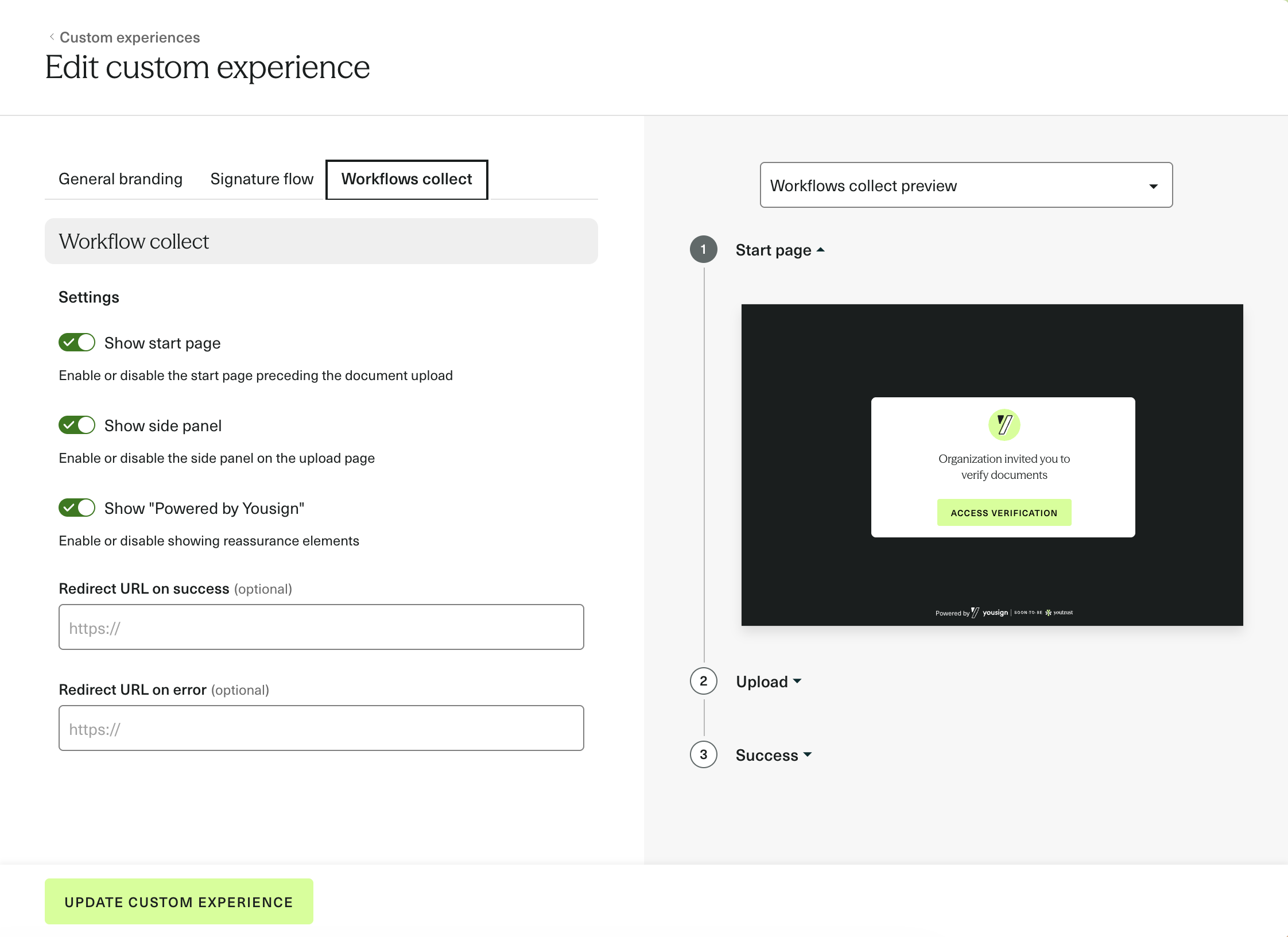
The following settings are available:
- Branding: company logo, background color, text color, button color
- Flow settings: show/hide the start page, show/hide the side panel, show/hide the "Powered by Yousign" badge
- Redirect URLs: custom redirect on success or on error (optional)
Any update made to the Custom Experience in the app is reflected instantly across all Workflow Sessions using the associated template.
Learn how to set it up in the guide.