List all Signature Requests: Added a new limit query parameter to limit the number of items to retrieve for better performances
🐛 Bugs Fixed
iFrames: In Sandbox mode, setting the disable_domain_validation parameter to true now correctly allows any referrer by returning the response header frame-ancestors: *.
For users of our Electronic Seal with the Advanced level, it is now possible to specify which certificate you want to use when performing the Sealing operation. This is done by passing an optional certificate_id field when Creating an Electronic Seal.
Note that the generation of Advanced Seal certificates is a process which requires identification documents for your company and its representatives. Please contact your Yousign customer representative for more information on this topic.
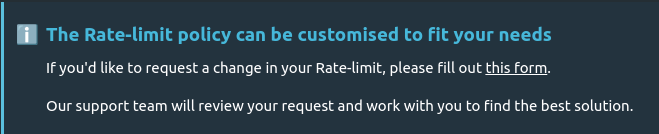
As we know your business can scale, you might need a higher Rate-limit for our API usage.
If your implementation respects our standards (mainly use Webhooks instead of massive polling), you can fill a customisation request available at the bottom of Limits page
Radio buttons are a useful and easy way to present a set of options to Signers and allow them to select one choice.
Today, we are introducing mechanisms that enable easy retrieval of selected options, if any. This will help you to build custom integration and behavior based on the Signer choice.
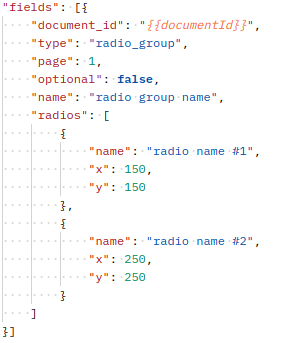
Radio and Radio Group now have name property
When adding Signer with a Radio Group Field, you can optionally set name in radiogroup and radio to better identify your Fields.
Here is the new syntax for Radio Group Smart Anchor. All details can be found in our documentation {{s1|radio|28|group_name|t|radio_name_1}} {{s1|radio|28|group_name|t|radio_name_2}}
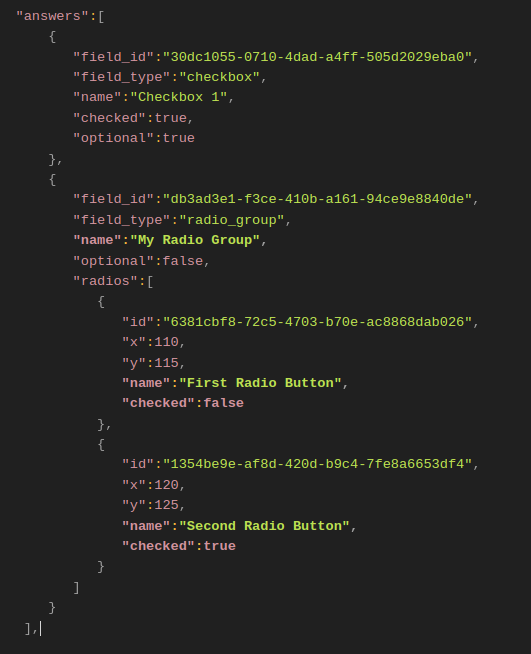
Returned payload
Those values are also returned in Signer's Field payloads
Radio names and values are now returned in the webhook payload
When returning radio data in a Webhook call, it now also contains name and checked in Signer's payload
This payload can also be found in signature_request , signer , and approver webhook Events, under signers > answers.
Metadata allows you to attach extra information to your Signature Requests. Our customers generally use it to provide specific context to their business.